
Are you struggling to log in to your Trust Wallet account? Whether you’re a seasoned user or a newcomer, navigating the login process can sometimes be challenging. In this comprehensive guide, we’ll walk you through the step-by-step process of logging in to your Trust Wallet account, ensuring a seamless experience every time.
Step-by-Step Tutorial for Logging into Trust Wallet
Download and Install Trust Wallet: Begin by downloading the Trust Wallet application from your app store onto your mobile device. Once installed, open the app to initiate the login process.
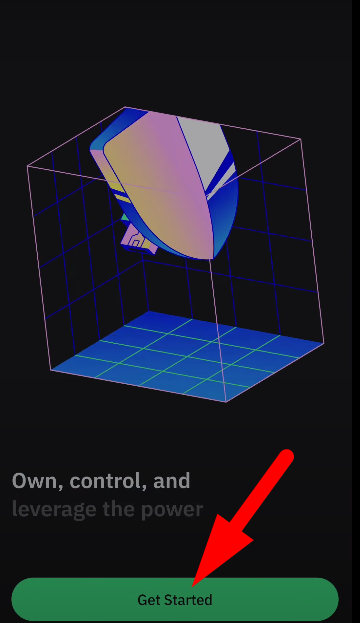
Step 1: Tap on “Get Started”
Upon opening the Trust Wallet app, you’ll be greeted with a welcome screen. Tap on “Get Started” to proceed to the login options.
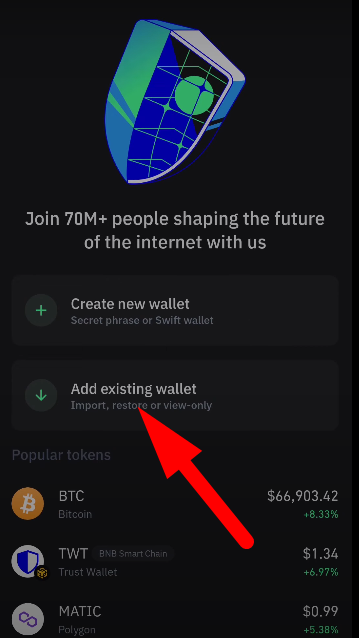
Step 2: Choose “Add Existing Wallet”
Since you already have a Trust Wallet account, select the “Add Existing Wallet” option instead of creating a new one. This will allow you to log in using your existing credentials.
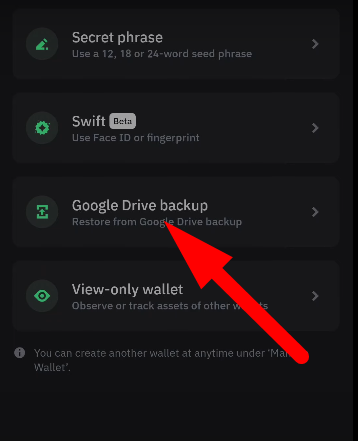
Step 2: Select Backup Option
Depending on the backup method you used when creating your Trust Wallet account, choose the appropriate option. If you backed up your wallet using Google Drive, select this option.
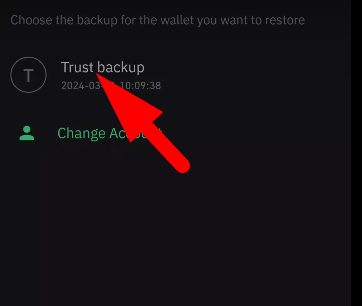
Step 3: Sign in to Google Account
Select your Google account from the list associated with your Trust Wallet backup. This will grant access to your backed-up wallet data stored on Google Drive.
Step 4: Enter Password
Once you’ve selected your Google account, you’ll be prompted to enter the password you created for your Trust Wallet backup. Type in the password and proceed to the next step.
Step 5: Restore Wallet
After entering the correct password, tap on “Restore Wallet” to initiate the login process. Trust Wallet will verify your credentials and restore your account data from the backup.
Step 6: Successful Login
Congratulations! You have now successfully logged in to your Trust Wallet account. You can now access your digital assets and manage your portfolio with ease.
Conclusion:
By following these simple steps, you can effortlessly log in to your Trust Wallet account and gain access to your digital assets. Whether you’re an experienced cryptocurrency enthusiast or a novice user, Trust Wallet provides a secure and user-friendly platform for managing your funds. Remember to subscribe to our channel for more tutorials and guides on navigating the world of cryptocurrency and blockchain technology.

Sourav is a seasoned financial expert with over 10 years of experience in the industry. He has worked with leading financial institutions, offering expert advice on personal finance, investments, and financial planning. With a deep understanding of banking and market trends, Sourav is dedicated to empowering individuals with the knowledge to make informed financial decisions. His passion is to simplify complex financial concepts and help others achieve long-term financial success.