
Are you a customer of Scotiabank looking to streamline your banking experience by registering for online banking? You’re in the right place! In this step-by-step guide, we’ll walk you through the process of setting up your Scotiabank online banking account. Whether you’re a new customer or transitioning to online banking, this tutorial will help you get started effortlessly.
Are you ready to take control of your banking experience with Scotiabank’s online platform? Follow these simple steps to register for your Scotiabank online banking account:
1. Visit the Scotiabank Website:
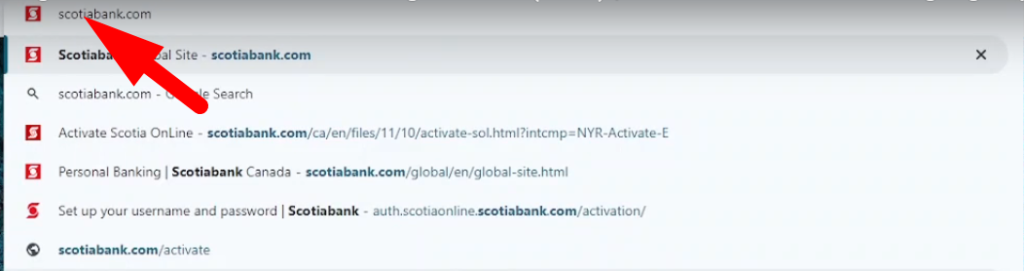
Open your web browser and type “scotiabank.com” into the URL bar. Press Enter to navigate to the Scotiabank website.
2. Access the Registration Page:
Look for the “Sign In” button on the Scotiabank homepage. Beneath this button, you’ll find an option labeled “Activate Now.” Click on this link to proceed to the registration page.

3. Gather Required Information:
Before you begin the registration process, make sure you have the following information on hand:
Scotiabank credit card number or account number
Home phone number
Date of birth
Mother’s maiden name
Postal code
4. Start the Registration Process:
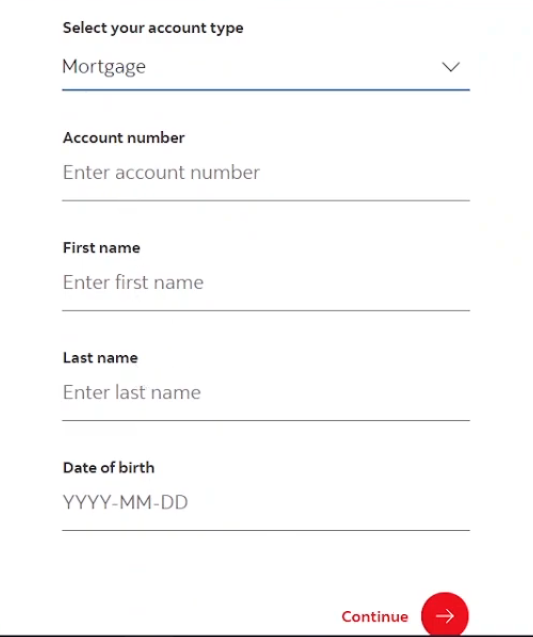
On the registration page, you’ll be prompted to select your account type (e.g., credit card, savings account). Enter your Scotiabank credit card number or account number in the designated field.
5. Enter Personal Details:
Next, provide additional personal details such as your address, postal code, date of birth, and mother’s maiden name. Ensure the information you provide matches the details on your Scotiabank account.
6. Create Username and Password:
Once your account information is verified, you’ll be prompted to create a username and password for your Scotiabank online banking account. Choose a username and password that are secure yet easy for you to remember.
7. Complete Registration:
After creating your username and password, follow any additional prompts to finalize the registration process. Review the provided information for accuracy before submitting your registration.
8. Confirmation:
Upon successful registration, you’ll receive a confirmation message indicating that your Scotiabank online banking account has been successfully set up.
Conclusion:
Congratulations! You’ve successfully registered for your Scotiabank online banking account. With access to Scotiabank’s online platform, you can conveniently manage your finances anytime, anywhere. Don’t forget to give this video a thumbs up and subscribe to our channel for more helpful tutorials. Thank you for choosing Scotiabank for your banking needs!

Sourav is a seasoned financial expert with over 10 years of experience in the industry. He has worked with leading financial institutions, offering expert advice on personal finance, investments, and financial planning. With a deep understanding of banking and market trends, Sourav is dedicated to empowering individuals with the knowledge to make informed financial decisions. His passion is to simplify complex financial concepts and help others achieve long-term financial success.